Technology makes STEM learning more meaningful when students use it to solve real problems rather than simply follow instructions on a screen. Coding kits, educational robots, interactive simulations, and digital learning platforms can turn abstract concepts into practical classroom experiences. The goal of tech to teach stem coding is to help students understand how technology works while developing problem-solving, creativity, logical thinking, and collaboration.
Successful implementation requires more than purchasing equipment. Teachers need clear learning objectives, suitable tools, structured activities, and ways to assess progress. A robot that moves across a classroom may look impressive, but the deeper educational value comes from students planning its route, testing commands, identifying errors, and explaining their decisions.
Research supports this emphasis on purposeful instruction. A 2025 meta-analysis published in the Journal of Computer Assisted Learning examined 46 empirical studies and reported positive effects from integrating computational thinking into STEM education, including cognitive and non-cognitive skills. The findings also highlighted the importance of instructional tools and intervention duration. The practical lesson is clear: technology works best when teachers connect it to consistent, well-planned learning.
Why STEM Coding Belongs in Modern Classrooms
STEM combines science, technology, engineering, and mathematics. Coding can connect these subjects by giving students a way to model ideas, test predictions, and control digital or physical systems. For example, students can program a simulated spacecraft, calculate the distance a robot travels, or use sensors to investigate changes in classroom conditions.
These activities also introduce computational thinking. Students learn to break complex problems into smaller steps, recognize patterns, create instructions, and revise solutions when results differ from expectations. These skills are useful beyond computer science because they encourage structured reasoning across subjects.
Tech to teach stem coding is especially valuable when students can see a direct relationship between their instructions and the outcome. A command produces movement, a variable changes a score, or a sensor triggers a response. Immediate feedback helps learners connect cause and effect, although teachers still need to explain the underlying concepts.
Coding should not replace foundational teaching. Students may need explicit instruction in measurement, fractions, electrical circuits, or scientific variables before they can use these concepts successfully in a project. Technology becomes more effective when it builds on that knowledge instead of competing with it.
Choosing the Right Educational Coding Tools
Block-Based Coding Platforms
Block-based platforms allow students to create programs by connecting visual commands. They reduce the burden of remembering punctuation and syntax, allowing beginners to focus on sequencing, loops, conditions, events, and variables.
For younger learners, these platforms can support animated stories, interactive games, and simple simulations. Older students can use the same concepts to develop more complex projects before progressing to text-based languages.
When selecting a platform for tech to teach stem coding, teachers should consider its age suitability, accessibility, curriculum alignment, device requirements, and opportunities for independent experimentation. A platform is useful when students can move from guided examples toward original work rather than merely reproduce a finished project.
Robotics and Physical Coding Kits
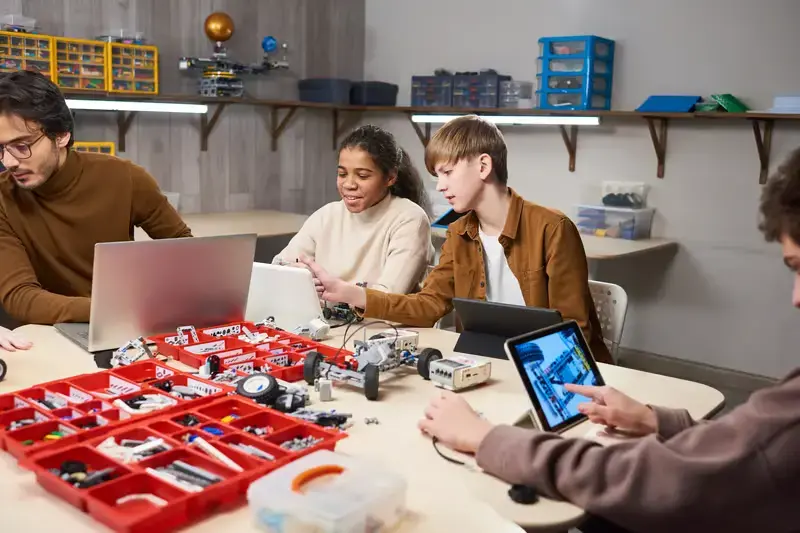
Robotics kits connect programming with movement, construction, and engineering. Depending on the kit, students may work with motors, wheels, lights, buttons, distance sensors, or other electronic components. They can design a machine, program its behavior, and observe how hardware responds to software instructions.
Physical feedback makes mistakes easier to investigate. If a robot turns too far, students can examine the timing, motor settings, wheel alignment, or surface conditions. This creates a practical reason to measure, test, and revise.
However, teachers should inspect the full cost of ownership. Batteries, replacement parts, storage, charging, software compatibility, and setup time can affect classroom use. A smaller collection of durable kits may provide better learning opportunities than a large set that teachers cannot maintain.
Simulations and Digital Science Tools
Simulations allow students to explore systems that may be expensive, dangerous, difficult to observe, or impractical to recreate in school. They can model forces, electrical circuits, ecosystems, or mathematical relationships while adjusting variables and observing changes.
These tools are particularly useful when students record predictions before changing a setting. They can compare expected and observed outcomes, then explain differences using evidence. Teachers should still distinguish simulated results from physical experiments because real-world conditions can introduce factors a model does not include.
Designing Lessons Around Learning Objectives
The strongest tech to teach stem coding lessons begin with a learning goal, not a product demonstration. Before choosing a kit, decide what students should understand or be able to do by the end of the activity.
A lesson might target sequencing, coordinate geometry, simple machines, or the relationship between sensors and automated decisions. The chosen tool should make that objective easier to teach and assess.
A practical lesson structure includes four stages. First, introduce the problem and ask students to predict a result. Second, demonstrate only the commands or components needed to begin. Third, let students build and test their own solutions. Finally, ask them to explain what worked, what failed, and what they would change.
This sequence prevents the activity from becoming an entertaining but shallow exercise. It also gives teachers opportunities to identify misconceptions while students work.
Example: Programming a Classroom Delivery Robot
Imagine a middle-school class designing a robot that carries a lightweight object from one desk to another. Students must plan a route around obstacles, estimate distances, and program the robot to stop at a target.
The teacher connects the activity to measurement, angles, sequencing, and debugging. Teams first draw their routes on paper and estimate the number of commands required. They then test their programs, record errors, and adjust movement durations or turning instructions.
The assessment focuses on more than reaching the destination. Students explain how they selected their commands, compare predicted and actual movement, and describe how they corrected mistakes. This makes the activity a lesson in engineering reasoning rather than a race to finish first.
Two Real-World Classroom Scenarios
Scenario One: A Primary Science Investigation
A primary teacher wants students to understand how environmental conditions affect plant growth. The class uses a basic programmable sensor system, where available, to record light or temperature readings near classroom plants. Students enter readings into a spreadsheet and compare observations across locations.
Students can then program a simple alert or create a chart showing changes over time. The coding element supports the science objective by helping them collect, organize, and interpret information.
The teacher should avoid claiming that a few readings prove why a plant grew differently. Instead, students discuss other possible factors, such as watering, soil, and plant variety. This encourages evidence-based reasoning and shows how technology can support scientific investigation without replacing scientific judgment.
Scenario Two: A Secondary Mathematics Challenge
A secondary mathematics teacher asks groups to program an animation that moves a character across a coordinate grid. Students must translate coordinate pairs into movement commands and calculate the distance between positions.
At first, some characters stop short or move beyond their intended points. Students inspect their coordinates, review the order of commands, and test revised calculations. The teacher uses these mistakes to discuss signed numbers, axes, and distance.
In this case, tech to teach stem coding creates a visible connection between mathematical rules and program behavior. The final assessment asks students to explain the mathematics behind their code, not simply show that the animation works. That distinction reveals whether the activity developed understanding or only procedural imitation.
These scenarios are illustrative classroom examples, not claims about specific measured outcomes. Teachers can adapt them to local curricula, available equipment, and student readiness.
Assessing Student Progress Beyond Completed Projects
A finished robot or animation does not automatically demonstrate learning. Students may copy a tutorial, rely heavily on a partner, or complete a task without understanding why the solution works. Assessment should therefore examine the thinking behind the product.
Useful evidence includes planning notes, code explanations, testing records, debugging decisions, and individual reflections. Teachers can ask students to predict what a command will do before running it, then explain unexpected results.
Tech to teach stem coding assessments should also separate technical success from conceptual understanding. A student might create a working program with substantial guidance but struggle to explain its logic. Another student might understand the logic yet encounter a minor hardware fault. Both need feedback, but their next learning steps will differ.
Short assessment rubrics can track four areas: understanding of the target concept, effective use of coding structures, ability to test and revise, and quality of explanation. The criteria should be shared before the activity so students understand what success requires.
Managing Classroom Challenges and Inclusion
Limited Budgets and Unequal Access
Schools do not need a complete robotics set for every student. Stations, shared equipment, paired programming, and rotating project roles can make limited resources more useful. Unplugged activities, such as arranging human instructions to guide a classmate through a grid, can introduce algorithms before computers are involved.
Teachers should also check whether required software works on existing devices and whether students can access it outside school. An activity that depends on expensive home equipment may create an unfair advantage.
Different Skill Levels and Accessibility Needs
Students often enter coding lessons with very different levels of experience. Provide optional challenges for advanced learners while offering visual instructions, worked examples, and smaller milestones for beginners. Pairing students can help, but roles should rotate so one learner does not become the permanent programmer while the other only watches.
Accessibility deserves attention during planning. Readable interfaces, keyboard alternatives, captions, adjustable settings, and flexible ways to demonstrate understanding can reduce unnecessary barriers. Teachers should confirm which features are available rather than assume every tool supports every need.
Teacher Training and Technical Support
A teacher does not need to know every answer before introducing coding, but they should understand the core learning objective and the tool’s basic operation. Practice the activity in advance, identify likely failure points, and prepare a non-digital alternative if equipment stops working.
A systematic review published in 2024 found that teacher professional development is an important area in efforts to integrate computational thinking into K-12 classrooms. Ongoing support matters because teachers need opportunities to refine lessons, share solutions, and build confidence beyond an introductory workshop.
Using Technology Purposefully, Not Just Frequently
More technology does not automatically produce better learning. The Education Endowment Foundation recommends identifying how a tool will improve teaching or learning before introducing it, alongside planning for training, support, resources, and cost.
Schools should therefore evaluate tools against a specific need. Does the platform improve the quality of practice? Does it provide useful feedback? Can students investigate ideas that would otherwise be difficult to test? If the same objective can be taught more clearly without a device, a digital tool may not be necessary.
For tech to teach stem coding programs, success should be measured through student work and understanding rather than equipment counts or screen time. Teachers can compare early and later explanations, review debugging records, and check whether students apply a concept to a new problem.
It is also helpful to revisit the program after several weeks. Students may initially enjoy a kit but stop making progress when activities become repetitive. A planned progression from guided tasks to open-ended challenges keeps the learning goal central and gives teachers better evidence of lasting development.
Conclusion
Educational technology can make STEM concepts easier to explore when students actively build, test, measure, and explain their work. Coding platforms, robotics kits, and simulations each offer different benefits, but none can replace thoughtful lesson design or skilled teaching.
The most effective tech to teach stem coding programs start with clear objectives, select tools that support those objectives, and assess the reasoning behind student projects. They also plan for accessibility, teacher training, maintenance, and unequal access to equipment. When these elements work together, technology becomes more than a classroom attraction. It becomes a practical way for students to develop technical knowledge, creative confidence, and problem-solving habits they can use in other subjects and future challenges.
FAQs
1. What does tech to teach STEM coding mean?
It refers to using educational technology, coding platforms, robotics kits, and digital simulations to teach science, technology, engineering, and mathematics. The aim is to develop computational thinking and practical problem-solving through structured, hands-on learning activities.
2. What are the best STEM coding kits for beginners?
The best kit depends on students’ ages, learning goals, budget, and available devices. Beginners often benefit from visual block-based programming, simple robotics components, clear instructions, and projects that allow them to experiment without extensive technical setup.
3. How does coding improve STEM learning?
Coding helps students break problems into steps, test predictions, identify errors, and revise solutions. When connected to mathematics or science objectives, it can make abstract ideas more concrete and encourage students to explain the reasoning behind their results.
4. Can teachers teach coding without expensive equipment?
Yes. Students can learn algorithms, sequencing, loops, and conditional logic through unplugged activities and free or low-cost coding platforms. Shared robotics kits and rotating stations can extend these lessons when physical hardware is available.
5. How can teachers measure the success of STEM coding lessons?
Assess students’ understanding, code explanations, testing strategies, and ability to correct errors. Compare their early and later work, and ask them to apply the same concepts to a new problem instead of judging learning solely by a finished project.